Best Zoom Lenses for Projectors and Projection Setups for 2026
When setting up projection systems, choosing the right zoom lens can dramatically affect image size, focus accuracy, and overall clarity. This article highlights top zoom-oriented lens options and projector attachments that help optimize screen brightness, keystone correction, and image scaling for both commercial and home theater environments. Each entry includes key specs and who it’s best for, so you can compare your options quickly.
Summary Table of Selected Products
| Product | Brand | Focus | Typical Use | Amazon Link |
|---|---|---|---|---|
| NEC NP41ZL 1.30 – 3.08:1 Zoom Lens | NEC | Zoom Lens (lens shift) | NEP-PA series projectors, installation | Link |
| KOD1634500 Ektanar FF Zoom Lens | KODAK | Zoom for Carousel 4400 | Film/slide projection systems | Link |
| Jimveo Outdoor 4K Projector | Jimveo | Auto Focus, Zoom, Keystone | Outdoor/portable projection | Link |
| NANLITE Pj-BM-25-45 Bowens Mount | NANLITE | Beam/Light shaping, zoom range | Projection lighting setups | Link |
| Evil Eye 20-60X Telephoto Lens | Evil eye | Zoom Telephoto for smartphones | Outdoor viewing and distant subjects | Link |
NEC NP41ZL 1.30 – 3.08:1 Zoom Lens
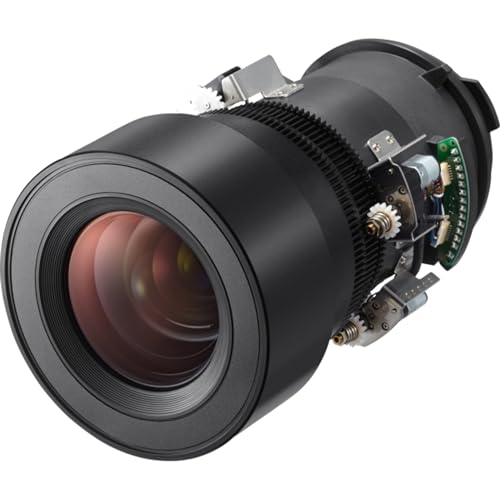
The NEC NP41ZL zoom lens is designed for NEC PA series projectors, offering a 1.3 to 3.02:1 zoom range with lens shift capabilities. This configuration supports versatile room sizes and seating distances, enabling smooth image scaling without distortion. Its lens shift allows positioning adjustments that help align the image with the screen, reducing keystone even before fine-tuning. Ideal for installations requiring precise image geometry and flexible placement, such as lecture halls and conference rooms.
Key points to consider with this lens:
– Zoom range supports a broad range of throw distances
– Lens shift helps preserve image geometry
– Compatible with multiple NEC PA models for easier integration
KOD1634500 Ektanar FF Zoom Lens for Carousel 4400

The Kodak Ektanar FF zoom lens is tailored for Carousel 4400 projection systems, providing a fixed focus range and zoom capabilities designed to enhance slide projection quality. While primarily associated with older slide technology, this lens is chosen by professionals maintaining vintage projection catalogs or integrating legacy components into modern displays. The FF designation means a specific field-flatness compatibility, which helps keep edges sharp across zoom positions.
What to evaluate:
– Compatibility with legacy Carousels and slide projectors
– FF design helps deliver even focus across the frame
– Useful for restoration or mixed-media projection environments
Jimveo Outdoor 4K Projector

The Jimveo outdoor projector enters the lineup as a portable 4K-capable device with AI auto-focus, auto keystone correction, and auto zoom. It supports media playback from USB and Wi-Fi/ Bluetooth connections, making it practical for backyard movie nights, outdoor events, and temporary projection setups. While not a traditional zoom lens, its built-in zoom and keystone tools simplify image alignment when projecting from variable distances.
Important considerations:
– Auto-focus and auto keystone reduce setup time
– 4K support with high contrast enables vivid outdoor viewing
– Built-in media playback expands standalone usability
NANLITE Pj-BM-25-45 Bowens Mount Projection Attachment

The NANLITE Pj-BM-25-45 is a 25°-45° zoom range projection attachment designed for Bowens-mount light fixtures used in film and stage production environments. While not a dedicated projection lens, it enables precise beam shaping and zoom control for environments that require flexible lighting and projection integration. It’s compatible with popular light brands and helps tailor brightness and spread around a projection screen in studio-like setups.
Evil Eye 20-60X Telephoto Lens

The Evil Eye 20-60X telephoto phone lens offers substantial zoom for distant subjects when projecting or viewing. While primarily designed for smartphones, this lens can supplement projection setups that involve content capture or show-and-tell demonstrations where distant detail needs to be captured or showcased on a larger screen. It uses a durable aluminum body and includes a stable clip system to attach securely to devices.
Buying Guide: Zoom Lenses And Projection Attachments
Choosing the right zoom lens or projection accessory depends on your setup, room size, and content type. Consider the following perspectives to guide your decision:
- Projection type: If you are using modern DLP or LCD projectors, primarily focus on zoom lenses designed for your projector model (e.g., NEC NP41ZL) or compatible FF/FFP zoom lenses for imaging accuracy. For legacy Carousel or slide-projection systems, compatible Ektanar-style lenses may be necessary.
- Throw distance and screen size: A wide zoom range helps accommodate different room lengths. Lenses with lens shift preserve image geometry when mounting positions shift, reducing keystone distortion.
- Image quality and coatings: Look for anti-reflective coatings and high-quality glass to minimize ghosting and flare in bright environments. For outdoor use, brightness and contrast are critical; choose lenses and projectors with robust color performance and adequate lumen output.
- Installation and compatibility: Verify compatibility with existing projectors or lighting fixtures. Some zoom lenses are intended for specific projector families, while others serve as universal attachments for live events or photo/video workflows.
- Reliability and maintenance: For outdoor or travel setups, consider protective housings or lens caps, and ensure that autofocus and keystone correction features function reliably to reduce setup time.
- Content use cases: For live events, a combination of projector-based zoom and external lens attachments can help tailor the image to audience viewing angles. For archival or media playback, matching a lens’s field of view to the screen size ensures minimal distortion at the edges.
In short, the best zoom lens or projection accessory for you depends on whether you prioritize precise geometry, portability, ease of setup, or compatibility with legacy projection systems. Assess your room dimensions, projector model, and intended content to pick a solution that balances zoom range, image clarity, and installation flexibility.