Best USB Video Cameras for Desktop With HD Quality and Clear Audio
Choosing the best USB video camera for desktop ensures sharp visuals and clear sound for all your video calls, streaming, and conferencing needs. Below is a summary of 5 highly rated webcams, combining full HD resolution, noise-canceling microphones, and versatile features like privacy covers and automatic light correction to enhance performance in various environments.
| Product | Resolution | Key Features | Brand |
|---|---|---|---|
| NexiGo N60 1080P Webcam | 1080p Full HD | Adjustable FOV, Zoom, Privacy Cover, Built-in Noise-Cancelling Mic | NexiGo |
| Tewiky Full HD Webcam | 1080p Full HD | Wide Angle Lens, Noise-Cancelling Mic, Auto Light Correction | Tewiky |
| Shcngqio 1080P HD Webcam | 1080p Full HD | Wide-Angle Lens, Noise Reduction, Auto Light Correction | Shcngqio |
| Logitech C920x HD Pro Webcam | 1080p Full HD | HD Light Correction, Autofocus, Dual Mics | Logitech |
| Septekon 1080P HD Webcam | 1080p Full HD | Stereo Mic, Plug & Play, Noise Reduction | Septekon |
NexiGo N60 1080P Webcam with Adjustable Zoom

The NexiGo N60 delivers full HD 1080p video quality with clarity up to 1920 x 1080 at 30fps. Its 3.6mm glass lens provides sharp imaging optimized for distances between 19.6 inches and 13 feet. The fixed focal length lens supports a wide 110° viewing angle, which can be digitally zoomed and customized with the NexiGo software for ideal workspace framing. It includes a privacy cover for security, and the built-in noise-canceling microphone ensures clear audio during Zoom, Skype, Teams, or streaming sessions. The plug-and-play USB setup allows easy connection on Windows and Mac systems without additional drivers.
Tewiky Full HD Webcam with Rotatable Tripod

The Tewiky 1080p HD Webcam features a wide-angle lens that captures crisp video at 30 fps, making it suitable for gaming, teaching, or professional calls. It incorporates automatic light correction technology that adjusts the brightness and restores color balance based on ambient lighting conditions for an optimal image. The integrated noise-canceling microphone reduces background interference, ensuring your voice comes in clear even in noisy environments. This model also has a rotatable tripod, offering flexible positioning on any desktop or laptop.
Shcngqio 1080P Webcam with Auto Light Correction

The Shcngqio TWC29 webcam offers 1080p HD clarity at 30 fps with a wide-angle lens that captures vibrant, detailed visuals. Its noise-reducing microphone filters out ambient noise for clearer voice transmission, useful for professional video conferencing or live streaming. The camera’s automatic light correction dynamically adjusts brightness and color to maintain perfect clarity, even in low light or bright conditions. This ensures you look natural and well-lit across all video calls and recordings without manual adjustments.
Logitech C920x HD Pro Webcam with Dual Mics

Logitech’s C920x HD Pro Webcam delivers full HD 1080p video with autofocus and automatic light correction, producing bright, sharp images even in dim environments. Its stereo audio system features dual microphones that capture natural sound with noise reduction for clear voice communication. This webcam is compatible with most video conferencing platforms, offering seamless PC and Mac integration. Its robust software enhances video capture and live streaming with ease, making it one of the most widely trusted webcams for professional use.
Septekon 1080P Webcam with Noise Reduction
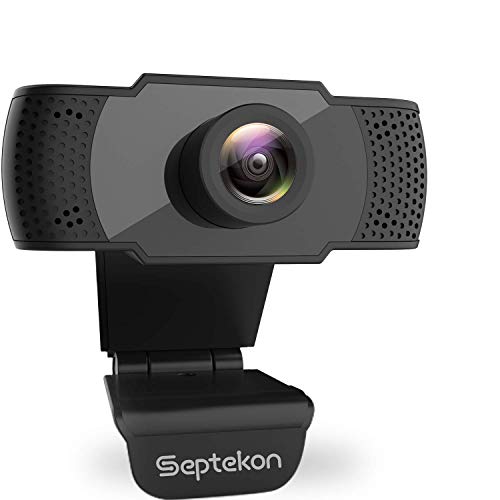
The Septekon 1080p HD Webcam boasts a clear 2 million pixel lens capturing high-definition video at 30fps. The built-in stereo microphone offers noise reduction and echo cancellation, enabling crystal-clear audio up to 10 feet away. Its plug-and-play USB connection requires no drivers for hassle-free setup on Windows, Mac, TV, or Xbox. This webcam is designed to produce smooth, high-quality video and outstanding audio quality for various uses, including video calls, gaming, and live streaming.
Buying Guide for the Best USB Video Camera for Desktop
Selecting a USB video camera for desktop can be simplified by considering the following important features and comparison points:
1. Video Resolution and Frame Rate
Look for webcams supporting at least 1080p Full HD resolution with a frame rate of 30fps or higher. This ensures smooth, detailed video quality suitable for conferencing and streaming.
2. Lens and Field of View (FOV)
Wide-angle lenses (around 90° to 110°) capture more background and participants. Some models offer adjustable FOV or zoom, allowing personal customization of the visual framing.
3. Microphone Quality
A built-in noise-canceling or noise-reducing microphone enhances audio clarity by filtering ambient noise. Dual microphones improve stereo sound and voice pickup, ideal for professional calls.
4. Light Correction and Autofocus
Automatic light correction technology adjusts brightness and color balance based on ambient lighting, ensuring you appear clear in different environments. Autofocus keeps your video crisp even if you move during calls.
5. Privacy Features
Webcams with a physical privacy cover provide security by blocking the lens when not in use, preventing unauthorized viewing.
6. Mounting Options and Design
Consider webcams with flexible mounts like clip-on designs or rotatable tripods for stable and adjustable positioning on desktops, laptops, or monitors.
7. Compatibility and Plug-and-Play Support
Ensure the webcam supports USB connectivity with Windows and Mac OS, requiring no additional drivers. Compatibility with popular applications like Zoom, Skype, Microsoft Teams, and streaming platforms is essential.
8. Additional Software Features
Some manufacturers offer proprietary software for zoom adjustment, exposure control, and custom settings. These tools can enhance your video customization options.
By evaluating these criteria and matching them to your usage scenario — such as video conferencing, teaching, streaming, or recording — you can identify the best USB video camera for your desktop setup that offers high-quality video and audio performance.