Best PTZ Camera Keyboard Controllers for Live Streaming and Production
For professional live streaming, church services, sports events, and educational broadcasts, a dedicated PTZ camera keyboard controller streamlines control, speeds up workflows, and improves shot accuracy. This guide highlights five top Amazon options, detailing how they handle Pan-Tilt-Zoom, focus, presets, and network protocols to support reliable multi-camera setups. Each product is evaluated based on compatibility, ease of use, expansion potential, and overall control precision.
Comparison Snapshot
| Product | Brand | Key Features | Communication |
|---|---|---|---|
| PowerJoy PTZ Camera Controller | AVKANS | 4D joystick, VISCA/IP, POE, 255 cameras, presets | Ethernet IP |
| PowerJoy Gen-2 PTZ Controller | AVKANS | 4D joystick, 6 camera shortcuts, NDI-friendly | Ethernet IP |
| Mini Analog PTZ Keyboard | EVERSECU | 4D joystick, RS485, multi-protocol support | RS485 |
| KC608 Pro NDI PTZ Controller | FoMaKo | NDI license, 4D joystick, PoE, RS232/422/485 | Ethernet IP |
| NDI PTZ Controller KB200MAX | Tenveo | 5″ LCD, 4D joystick, NDI control, 255 cameras, multi-protocol | Ethernet IP |
AVKANS PowerJoy PTZ Camera Controller

The AVKANS PowerJoy PTZ Camera Controller is designed for multi-camera live streaming and church worship production. It supports VISCA over IP, Visca, Pelco-D, and Pelco-P protocols, enabling flexible integration with various PTZ cameras. The PoE feature powers the unit through a single Ethernet cable and allows control across a network, compatible with AVKANS and many third-party PTZ cameras. It provides control over pan, tilt, zoom, focus, iris, shutter, and backlight, plus presets and tracking, with up to 255 network cameras supported. RS232, RS422, RS485, and Ethernet IP connections are available for broad compatibility.
AVKANS PowerJoy Gen-2 PTZ Controller
AVKANS Gen-2 enhances network PTZ control with a robust 4D joystick setup and multiple camera shortcuts. It supports VISCA over IP, Visca, Pelco-D, and Pelco-P, making it suitable for multi-camera live streaming, church services, and video production. The PoE-enabled design powers the unit via a single Ethernet cable and ensures reliable network performance. It works well with AVKANS PTZ cameras and other brands. Users can manage pan, tilt, zoom, focus, iris, shutter, and backlight, along with presets and tracking, with up to 100 network cameras supported and a selection of 6 camera shortcuts.
EVERSECU Mini Analog PTZ Keyboard

The EVERSECU Mini Analog PTZ Keyboard is a compact option with a 4D joystick designed for rapid PTZ control of speed dome and analog cameras that may not integrate easily with DVR systems. It supports Pelco protocols via RS485 and allows control of up to 255 PTZ cameras (128 in parallel) with various baud rates. The keyboard is suited for venues requiring quick, reliable manual camera adjustments and is compatible with multiple ASIN-referenced cameras. This model emphasizes ease of use and broad protocol support for versatile installations.
FoMaKo KC608 Pro NDI PTZ Controller
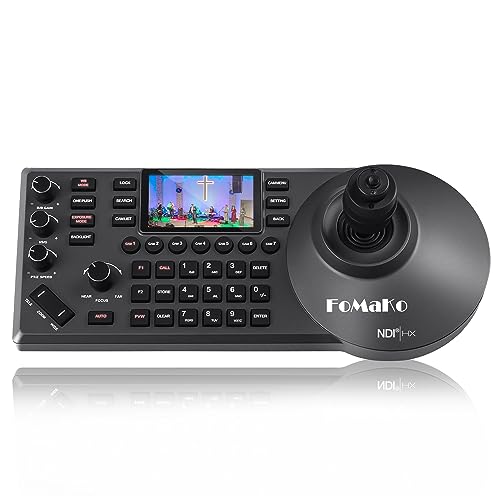
The FoMaKo KC608 Pro NDI PTZ Controller combines NDI support with a 4D joystick, enabling advanced control for NDI workflows. It includes an NDI license and PoE, simplifying deployment in networked environments. The controller supports VISCA, Pelco-P and Pelco-D protocols and offers RS232, RS422, RS485, and Ethernet IP connections. This model is designed for church services, education, and broadcast environments where NDI integration and dependable IP control are priorities, with smooth presets and rapid PTZ adjustments.
Tenveo NDI PTZ Controller with 5″ LCD
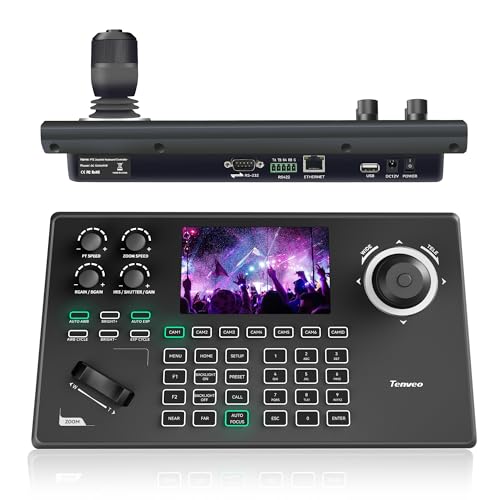
Tenveo’s NDI PTZ Controller KB200MAX combines a 5-inch real-time preview LCD with a 4D joystick for precise control. It supports dual network and analog modes, enabling compatibility with NDI, VISCA, Pelco-P, and Pelco-D protocols. The kit can manage up to 255 PTZ cameras and offers seven-camera shortcuts, making it suitable for streaming platforms, OBS, vMix, and conferencing tools. It includes an NDI license and is designed for church services, live events, and production teams seeking strong multi-camera coordination.
Buying Guide: Key Considerations for PTZ Camera Keyboard Controllers
- Protocol compatibility: Ensure the controller supports VISCA over IP, VISCA, Pelco-D, Pelco-P, and any camera brands you already use. Multi-protocol support offers future-proofing for mixed camera ecosystems.
- Power and networking: PoE-enabled units simplify installation by using a single Ethernet cable. If PoE isn’t available, verify alternative power methods and acceptable cable types for your setup.
- NDI and IP workflow: For live streaming and professional production, NDI compatibility is highly valuable. Confirm whether the device ships with an NDI license and supports NDI|HX variants if needed.
- Joystick precision and ergonomics: A true 4D joystick with adjustable pan/tilt speed and responsive focus/zoom controls improves shot responsiveness. Consider physical layout and key/shortcut accessibility for fast operation.
- Camera capacity and shortcuts: Look at the maximum number of cameras supported and the availability of quick-access shortcuts. Large productions may require support for dozens or hundreds of cameras.
- OSD and preset management: An on-screen display (OSD) and robust preset recall simplify operating complex multi-camera scenes. Check for preset recall, automations, and tracking modes if needed.
- Connectivity options: Verify RS232/RS422/RS485, Ethernet IP, and compatibility with your control room’s routing and switchers. This affects integration with existing gear.
- Display and monitoring: Some models include a built-in LCD or a preview screen to monitor camera outputs without leaving the control panel. This feature can reduce operator workload during live events.
- Expansion potential: Consider future camera installations or upgrades. A controller that supports more cameras or can be paired with additional control devices provides room for growth.
- Warranty and support: Check the manufacturer’s warranty terms and the availability of technical support or user communities for troubleshooting and best practices.
When assessing options, prioritize models that align with your existing camera lineup, network infrastructure, and streaming software. A PoE-enabled, NDI-capable controller with multi-protocol support generally delivers the strongest long-term value for mid-to-large productions, while compact analog-focused units may suit smaller venues or retrofits.