Best Mini Hot Shoe Adapter Guide for Off-Camera Lighting and Audio
The mini hot shoe adapter market helps creators expand their on-camera setups by mounting LED lights, receivers, and microphones on compact devices. This article reviews five top picks that fit common mini and standard shoe formats, offering quick access to off-camera lighting and audio accessories. Each option prioritizes secure mounting, ease of use, and compatibility with popular camcorders and cameras. Below, you’ll find direct product sections, a concise buying guide, and a quick summary table to compare key aspects at a glance.
| Product | Brand | Primary Use |
|---|---|---|
| JJC MSA-1 Mini Advanced Hot Shoe To Universal Shoe Adapter | JJC | Canon Vixia series and similar cams |
| JJC Standard Hot Shoe Adapter with PC Sync & 3.5mm Port | JJC | Trigger flash or light via PC sync or 3.5mm |
| JJC Standard Hot Shoe Adapter with PC Sync & 3.5mm Port | JJC | Cold shoe + 1/4″-20 for off-camera flash |
| DJI Mic Series Camera Adapter | DJI | Connect DJI Mic Mini/Mic 3 to Sony MI hot shoe |
| PIXEL Standard Hot Shoe Adapter with PC Sync & 3.5mm Port | PIXEL | Connect third-party flash via PC sync and 3.5mm |
JJC MSA-1 Mini Advanced Hot Shoe To Universal Shoe Adapter

The JJC MSA-1 Mini Advanced Hot Shoe adapter converts a Canon Mini Advanced Shoe to a universal shoe, enabling mounting of LED lights or microphones on Canon camcorders. It is designed as a universal shoe mount only and does not transfer electrical signals. This makes it ideal for mounting non-powered accessories without altering camera electronics. Secure tightening and compatible fit for Canon Vixia M-series devices are highlighted features. This adapter adds accessory flexibility while maintaining a compact form factor for handheld camcorders.
JJC Standard Hot Shoe Adapter With PC Sync & 3.5mm Port

This adapter combines a standard ISO hot shoe on top with a standard ISO shoe on the bottom and adds a PC sync port plus a 3.5mm mini jack. It enables triggering a flash or studio light via the PC sync or the side 3.5mm port. The unit is ideal for photographers and videographers who want to control off-camera lighting from the camera body, though a sync cable is not included. It supports both off-camera flash and continuous lighting setups through straightforward wiring options.
JJC Standard Hot Shoe Adapter With PC Sync Port & 3.5mm Port (Cold Shoe Bottom)
This variant features a cold shoe bottom with a 1/4″-20 tripod socket, enabling sturdy mounting on tripods or rigs. It includes a PC sync port and a 3.5mm mini phone socket for triggering off-camera lights or flashes. It is designed to facilitate flexible lighting setups while maintaining compact dimensions. Like similar adapters, a sync cable is not included, so users supply their own connection to compatible flash or strobes.
DJI Mic Series Camera Adapter
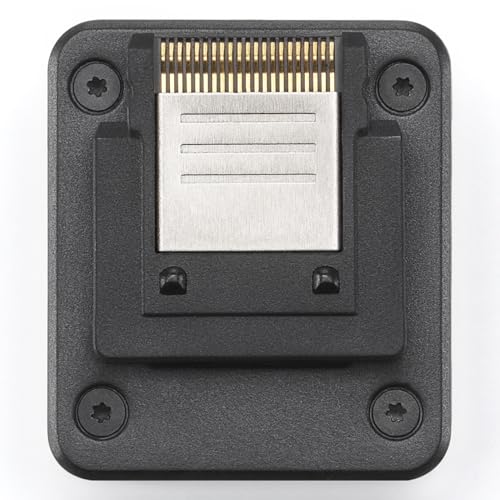
This adapter connects the DJI Mic Mini and Mic 3 Receiver directly to a Sony camera’s MI hot shoe. It supports 48kHz 24-bit digital audio recording and four-channel independent output. It is compatible specifically with Sony MI hot shoe configurations. This option provides an integrated audio solution when using DJI wireless mics, ensuring clean digital audio capture without adapters that cross-signal formats.
JJC MSA-1 Mini Advanced Hot Shoe To Universal Shoe

Another JJC option mirrors the MSA-1’s core function: allowing standard cold shoe devices to mount on Canon camcorders with a Mini Advanced Shoe. It tightens down securely and prevents contact with electrical contacts, preserving camera safety. Compatibility covers popular Canon Vixia models like HF10/11/100 and HF S-series, ensuring a stable platform for attaching accessories without triggering camera malfunctions.
JJC Cold Shoe Mount Adapter for DJI Mic Mini
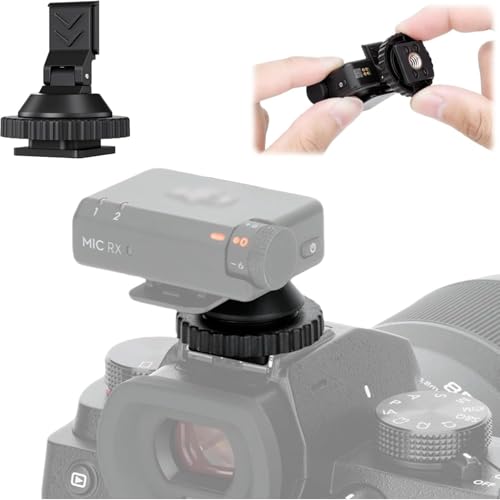
Designed for DJI Mic Mini, this ABS cold shoe adapter is not for DJI Mic 1/2 models. It includes a 1/4″-20 mounting thread on the bottom, expanding compatibility to cameras, tripods, and other rigs. The adapter emphasizes secure mounting to reduce vibrations and noise in audio capture, while offering flexible positioning options for improved sound capture in various shooting scenarios.
UTEBIT 2 Pack Mini Ball Head With 1/4″ Hot Shoe Mount

This dual-pack mini ball head includes a 1/4″ hot shoe mount adapter and supports 360° rotation with 90° tilt. It’s ideal for adjusting lighting angles, microphones, or small accessories on compact rigs. The product emphasizes versatility in small spaces, enabling precise positioning for better lighting and audio capture in tight shooting environments.
PIXEL Standard Hot Shoe Adapter with PC Sync & 3.5mm Port
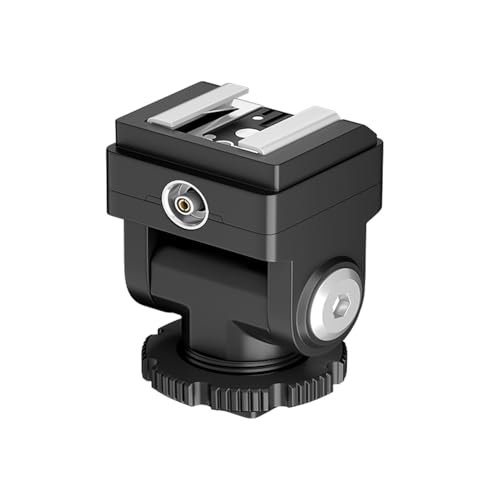
This PIXEL adapter is designed to trigger off-camera flashes and studio lights via PC sync or 3.5mm cords. It slides into a camera’s hot shoe and supports third-party flash configurations. It’s particularly useful for small-on-camera lighting setups or when integrating light modifiers that require a standard hot shoe connection with additional optical or electrical control through the PC port.
Buying Guide: Key Considerations For Mini Hot Shoe Adapters
- Compatibility: Check the camera model and hot shoe type (mini advanced, standard ISO, cold shoe) to ensure the adapter fits securely and does not contact camera electronics.
- Electrical vs. Mechanical: Some adapters are purely mechanical (no electrical connection). If you need to trigger lighting or audio devices, prioritize units with PC sync or 3.5mm ports, and confirm whether a compatible sync cable is included or required.
- Bottom Mounting Options: A few adapters include a 1/4″-20 socket for tripod or stand mounting. This is helpful for stable rigs, but confirm the bottom threading and compatibility with your gear.
- Security and Durability: Look for solid locking mechanisms and high-quality materials to minimize vibrations and movement that could degrade audio or lighting performance.
- Weight And Size: For on-camera use, compact and lightweight adapters reduce balance issues. Consider the combined footprint with any lights or mics you plan to mount.
- Accessory Ecosystem: Some brands offer bundled options with cables, cold shoe mounts, or extra adapters. Evaluate whether a broader kit better suits your workflow.
- Port Availability: If you need simultaneous control of multiple devices, ensure the adapter provides multiple ports (PC sync and 3.5mm) and assess cable length requirements.
- Use Case Scenarios: For casual vlogging, a simple mechanical mount may suffice. For professional setups, a mix of mechanical and wired control options can improve reliability in dynamic environments.
Technical Comparisons At A Glance
- Mini Advanced vs Standard: Mini/advanced shoe adapters focus on Canon Vixia or similar camcorders; standard ISO adapters emphasize broader lighting control with additional ports.
- Electrical Pass-Through: If you need to power or trigger devices, choose adapters with PC sync and 3.5mm ports; otherwise, a mechanical mount is safer for non-electrical accessories.
- Bottom Mounting: Cold shoe bottoms with 1/4″-20 sockets offer tripod compatibility, increasing versatility for rigs and gimbals.
- Brand Ecosystem: Established brands like JJC and PIXEL often provide consistent build quality and compatible accessories across lines, simplifying accessory management.