Best High Quality HD Camera for Every Need
Finding a high quality HD camera means balancing resolution, frame rate, and features with your intended use—streaming, video conferencing, or on-the-go shooting. This guide highlights five strong options, spanning webcams for everyday calls to professional-grade camcorders. Each entry covers core specs, standout features, and practical uses to help you compare at a glance.
Summary of chosen products:
| Product | Brand | Resolution / Key Feature | Use Case |
|---|---|---|---|
| Shcngqio 1080P HD Webcam | Shcngqio | 1080P, wide-angle, noise-canceling mic | Remote meetings, streaming, online classes |
| Logitech C920x HD Pro | Logitech | 1080p/30fps, auto light correction | Web conferencing, content creation |
| Logitech MX Brio Ultra HD 4K | Logitech | 4K/30fps or 1080p/60fps, AI-enhanced | Professional streaming, collaborative work |
| Minolta 4K Ultra HD Pocket Camcorder | Minolta | 4K, 16MP photos, 170° wide, rotating head | Travel vlogging, on-the-go shoots |
| MWIRB 8K Video Camera Camcorder | MWIRB | 8K/15FPS, 88MP, 18x zoom, remote | High-end content creation, studio shoots |
Shcngqio 1080P HD Webcam With Microphone

The Shcngqio TWC29 webcam delivers 1080p clarity with a wide-angle lens and a noise-canceling microphone. It uses automatic light correction to ensure you look clear in varying lighting, from dim home offices to bright rooms. Ideal for video calls, teaching, live streaming, and online content creation, this webcam emphasizes reliable performance in everyday environments.
Logitech C920x HD Pro PC Webcam

The Logitech C920x HD Pro offers Full HD 1080p recording with strong autofocus and lighting adjustments. It’s designed for compatibility with major video conferencing platforms and streaming software. A solid choice for professionals who need dependable image quality and straightforward setup across laptops or desktops.
Logitech MX Brio Ultra HD 4K Webcam

The MX Brio delivers Ultra HD 4K video with features like AI-assisted image processing, higher pixel density, and advanced exposure control. It supports 4K streaming and 1080p at 60fps, with enhancements such as better skin tones and reduced noise in challenging lighting, making it a top pick for professional-quality video meetings and livestreams.
Minolta 4K Ultra HD Pocket Camcorder

This compact 4K camcorder captures high-resolution video and 16MP photos with a 170-degree wide-angle lens and a 270-degree rotating head. It’s designed for versatile shooting scenarios—from action-packed vlogs to family events—while offering an easy-to-use interface and flexible mounting options for on-the-go recording.
MWIRB 8K Video Camera Camcorder
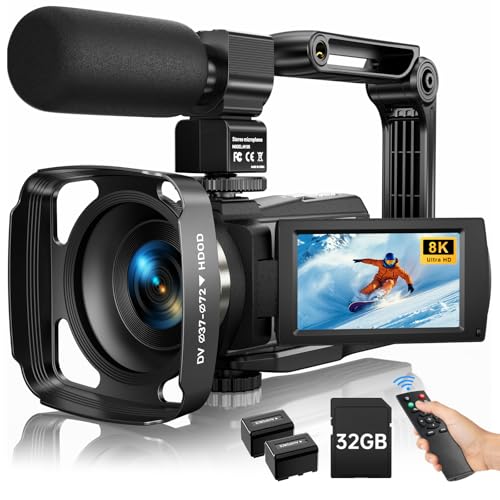
The 8K camcorder from MWIRB pushes the boundaries with 8K video at 15fps and 88MP image resolution, plus infrared night vision and built-in Wi‑Fi. An ideal choice for creators seeking ultra-high resolution and extensive reach across platforms, including sharing content via a companion app for quick distribution.
Buying Guide: Key Considerations And Comparisons
Resolution and frame rate: Higher resolutions like 4K or 8K deliver crisper footage, but require more storage and processing power. For live streaming or frequent video calls, 1080p at 30–60fps often suffices. Consider your target platforms and bandwidth when deciding between 1080p, 4K, or higher.
Lenses and field of view: Wide-angle lenses capture more of the scene, which is helpful for group calls or streaming in tight spaces. However, ultra-wide views can distort edges; test how your space looks on camera before committing. Rotating or flexible lens heads add versatility for on-the-go shooting.
Audio quality: A built-in mic with noise cancellation helps in noisy environments, but external mics or dedicated audio setups can dramatically improve sound. If mic quality is critical, prioritize models with robust audio features or plan to pair with an external microphone.
Lighting and exposure: Cameras with automatic light correction or advanced auto exposure handle inconsistent lighting well. For best results, pair with good ambient lighting and consider a basic lighting kit if you frequently shoot in low light.
Connectivity and compatibility: Look for USB-C or USB-A compatibility, plug-and-play simplicity, and compatibility with common platforms (Zoom, Teams, Skype, YouTube). Some models also offer companion apps for easy setup and remote sharing.
Stabilization and image processing: Anti-shake and AI-enhanced processing help maintain clarity during movement or in dynamic scenes. This is especially valuable for handheld recording or vlogging on the go.
Portability and battery life: Camcorders with longer battery life, multiple batteries, and compact form factors suit travelers and creators who shoot away from outlets. Webcams excel in stationary desk setups, requiring fewer power concerns.
Price-to-performance balance: Decide which features are essential for your workflow and compare total costs, including accessories like tripods, mics, or lighting. Focus on the combination that delivers the most reliable results for your needs.