Best External Cameras for MacBook: Top Picks for Streaming, Video Calls, and Privacy
Finding the best external camera for your MacBook enhances video clarity, boosts streaming quality, and protects your privacy. The following selection features reliable webcams and webcam covers that are compatible with MacBooks, offering high resolution, built-in microphones, and privacy options. Below is a summary table of the top products reviewed for effortless comparison.
| Product | Resolution | Privacy Cover | Microphone | Special Features |
|---|---|---|---|---|
| GUSGU G910 2K Quad HD Webcam | 2560×1440 (2.5K) | Yes (Built-in) | Yes | Adjustable ring light with 3 brightness levels |
| Dobuhont 2K Ultra HD Webcam | 2560×1440 (2K) | Yes (Sliding cover) | Yes (Noise reduction) | Adjustable stand with 360° rotation |
| TOUCAN 1080P Webcam | 1920×1080 (Full HD) | Yes (Privacy cover) | Yes (Clear stereo audio) | Auto light correction, 60fps video |
| CloudValley Webcam Cover Slide (2-Pack) | Not a camera | Yes (Metal cover) | No | Ultra-thin 0.023 inch minimalist design |
| Cuwada 1080P USB Webcam | 1920×1080 (Full HD) | Yes (Built-in privacy cover) | Yes (Dual noise canceling mic) | Undistorted lens with auto brightness adjustment |
GUSGU G910 2K Quad HD Webcam for MacBook

The GUSGU G910 standout feature is its 2.5K Quad HD resolution (2560×1440), delivering crystal-clear video with a 5-megapixel sensor. It offers a ring light with both white and warm colors, each with three adjustable brightness levels, perfect for brightening your video calls or streams. The webcam includes a built-in privacy cover for security, letting users physically block the lens when not in use. This USB camera is ideal for MacBook users seeking enhanced image quality and lighting controls during video conferencing or content creation.
Dobuhont 2K Ultra HD Webcam with Adjustable Stand

This Dobuhont 2K webcam offers impressive 2560×1440 resolution at 30fps and a built-in microphone with noise reduction, filtering background sounds for clearer conversations. It features a versatile adjustable stand enabling tilt, 360-degree rotation, and an extendable base that fits laptops, monitors, tripods, and desks. The sliding privacy cover adds security by covering the lens when not in use. This versatile camera supports a wide variety of setups, making it a great choice for MacBook users requiring custom positioning and privacy.
TOUCAN 1080P Webcam with Clear Stereo Microphone

The TOUCAN 1080P webcam delivers Full HD 1080p video at 60fps with automatic light correction to adapt to ambient lighting. Its built-in stereo microphone captures clear audio, enhancing meeting and streaming quality. The webcam comes equipped with a privacy cover to prevent unauthorized access. Its plug-and-play design simplifies setup on MacBooks or other laptops. The wide 115-degree field of view and smooth video performance suits professional communication and casual streaming alike.
CloudValley Ultra-Thin Webcam Cover Slide (2-Pack)

The CloudValley Webcam Cover Slide offers a simple yet effective solution for privacy protection. Made from ultra-thin metal (0.023 inch), its minimalist black design fits MacBook Pro, MacBook Air, iMac, tablets, and smartphones without affecting device closure. This physical cover blocks the camera lens when not in use, ensuring that no unauthorized visual access occurs. It is an ideal accessory for users who prefer using built-in MacBook webcams but want additional peace of mind.
Cuwada 1080P USB Webcam with Dual Noise Canceling Mic
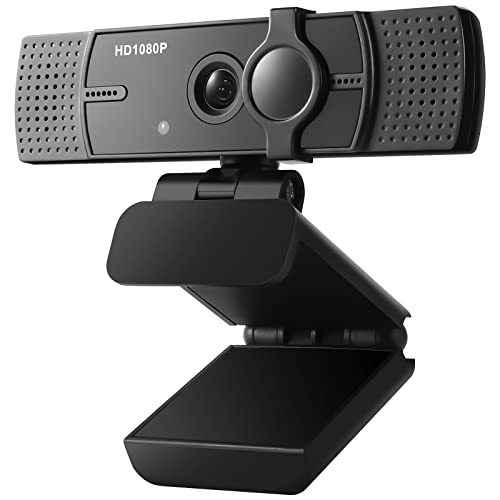
The Cuwada 1080P Webcam features Full HD resolution at 30fps with an advanced undistorted lens that avoids fisheye effects, providing sharper and more precise images. Automatic light correction ensures optimal brightness to enhance your appearance. Equipped with a dual noise canceling microphone, it captures clear audio from up to 10 meters, minimizing background noise. The webcam also includes a built-in privacy cover, making it a great all-around choice for secure, clear video calls on MacBooks.
Buying Guide: How to Choose the Best External Camera for Your MacBook
Video Resolution and Frame Rate
For high-quality video calls or streaming, look for webcams offering at least 1080p Full HD resolution. Some models support 2K or Quad HD, delivering even clearer images. Also, consider frame rates; 30fps is standard, but 60fps produces smoother video, especially for live streaming.
Built-in Microphone Quality
A webcam’s microphone is crucial for clear communication. Choose webcams with noise-canceling microphones that reduce background noise for clearer voice pickup, enhancing your videos or meetings without needing an external mic.
Privacy Features
Physical privacy covers are essential to protect against unauthorized camera access or hacking. Webcams with sliding or built-in covers let you easily block the lens when not in use. For MacBook users valuing privacy, also consider external webcam covers for added security.
Mounting and Adjustability
Check if the webcam offers flexible mounting options such as clip-on, tripod compatibility, or adjustable stands. Features like tilt and rotation allow you to set the best viewing angle, especially useful for different MacBook setups and workspaces.
Lighting Adjustments
Webcams with auto light correction or integrated ring lights enhance image quality in low light environments, reducing shadows and improving your appearance. Adjustable brightness levels in integrated lights offer versatility for different settings.
Compatibility and Connectivity
Ensure the webcam is compatible with macOS and connects via USB or USB-C as required. Plug-and-play models simplify installation without needing extra drivers, providing hassle-free use on MacBooks.
Additional Accessories
Some webcams come with accessories like USB-C adapters or tripod mounts, adding versatility. You may also consider purchasing external memory card readers if working with multiple devices for content creation workflows.