Best Portable Digital Camera Printers for on-the-Go Photo Printing
Compact, wireless, and capable of turning mobile memories into tangible photos, portable digital camera printers are perfect for travelers, students, and everyday moments. This article highlights five top picks that combine ease of use with reliable print quality. Explore models from Liene and Kodak that support iOS and Android, offer different print formats, and run on USB-C or battery power for true portability. Below you’ll find quick buying guidance to help you choose the right mini printer for your lifestyle and devices.
| Product | Brand | Notes |
|---|---|---|
| Liene M100 4×6” Photo Printer | Liene | 4×6, Wi-Fi, includes cartridges and papers |
| KODAK Step Instant Smartphone Photo Printer | KODAK | 2×3” sticky-back prints, Zink, Bluetooth |
| KODAK Mini Shot 3 Retro 4PASS | KODAK | 3×3” prints, built-in camera, 4PASS |
| KODAK Mini Shot 2 Retro | KODAK | 2.1×3.4” prints, built-in camera, 4PASS |
| Liene Photo Printer 2×3 Mini | Liene | 2×3” adhesive photo paper, Zink |
Liene M100 4×6” Photo Printer

The Liene M100 is a compact, user-friendly photo printer designed for iPhone, Android, and PC. It ships with a cartridge and 100 sheets of photo paper, plus an additional box with more sheets and cartridges for extended use. The device emphasizes a minimalist, magnetic design for easy storage and transport. Print quality benefits from thermal-dye sublimation, offering vibrant colors and a laminated surface resistant to water, scratches, fingerprints, and fading. A built-in Wi-Fi hotspot enables a direct connection to your phone, keeping your prints fast and interference-free without requiring external networks. Regular print head maintenance is advised to avoid smudges.
KODAK Step Instant Smartphone Photo Printer
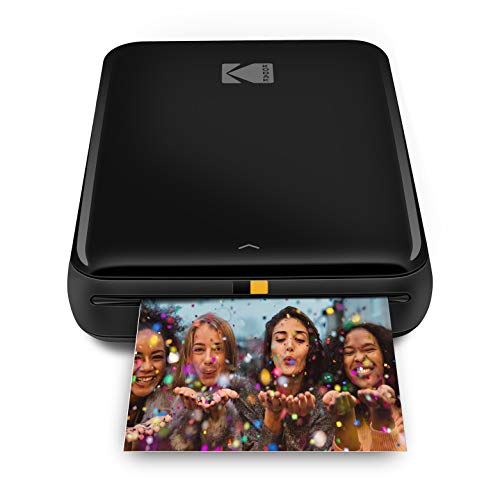
The Kodak Step Instant Printer uses Zink zero-ink technology for no-ink printing, delivering 2×3” sticky-back photos. It connects to iOS and Android devices via Bluetooth or NFC for immediate printing. The associated app provides full editing capabilities, including filters, borders, and stickers, making it easy to customize photos before printing. The resulting prints are moisture-resistant and durable thanks to dye-based color layers and a laminated finish. Ideal for quick memory-making on the go, though print sizes and adhesive-back format may limit some use cases.
KODAK Mini Shot 3 Retro 4PASS

The Kodak Mini Shot 3 Retro merges a digital camera with a built-in printer, enabling immediate 3×3” prints via Bluetooth or direct gallery print. It uses 4PASS technology to deliver vibrant photos with layered color and laminate protection, preserving images against fingerprints and water. The camera aspect supports capturing new images on the go, while the printer provides instant physical copies. This dual-function design is convenient for quick social moments, but you’ll want to consider whether the 3×3” format suits your photo display needs.
KODAK Mini Shot 2 Retro 4PASS

The Kodak Mini Shot 2 Retro offers a 2.1×3.4” print format with built-in camera functionality. It supports Bluetooth connection to Android and iOS devices for direct print from the gallery, using Kodak’s 4PASS technology for durable finishes. The compact form factor makes it ideal for pockets, backpacks, or school bags. Like other 4PASS Kodak printers, it emphasizes quick print times and strong photo quality, though the smaller print size may be a trade-off for those seeking larger photos or more display options.
Liene 2×3 Mini Portable Photo Printer

The Liene 2×3 Mini Printer uses Zink paper for 2×3” photos and includes adhesive-backed sheets for scrapbooks or photo albums. It eliminates ink cartridges, offering a cost-effective and eco-friendly printing experience. The device supports mobile printing via Bluetooth, with a compact design that’s easy to carry in a bag or pocket. The included paper supply of 50 sheets ensures you can start printing right away, and the printer’s polish and color retention make it suitable for casual snapshots and creative projects alike.
Buying Guide: Key Purchase Considerations
When selecting a portable digital camera printer, consider these core factors to match your needs:
- Print technology: Zink-based printers are ink-free and adhesive-friendly, while thermal-dye or 4PASS systems provide durable, laminated photos with higher color fidelity. Your choice affects cost per print and finish.
- Print size and format: Common sizes include 2×3”, 3×3”, and 4×6”. Choose formats based on how you plan to display or share prints (stickers, albums, frames).
- Connectivity: Bluetooth, NFC, and built-in Wi-Fi hotspots affect setup ease and performance. Direct phone-to-printer connections minimize interference and improve reliability in busy areas.
- Battery life and portability: Consider whether the printer is battery-powered, USB-rechargeable, or requires an outlet. For field use, lighter models with longer battery life offer practical advantages.
- Paper and ink economy: Look for included starter packs and the availability of replacement papers. Adhesive-backed papers enable immediate albuming or scrapbooking, expanding use cases beyond ordinary photos.
- App features: Photo-editing capabilities, filters, borders, and templates in the companion app can enhance prints before they’re produced. Ensure the app is available for your device ecosystem.
- Durability and water resistance: Laminated, fingerprint-resistant finishes help preserve memories, especially for kids or outdoor use.
- Cost of ownership: While initial prices vary, estimate per-print cost based on paper and cartridge needs. Eco-friendly options may offer long-term savings.
These devices serve a broad audience—from hobbyists and scrapbookers to quick-photo keepsakes for gifts or travel journals. Depending on the preferred print size, printing technology, and how you plan to display photos, you can choose a model that balances portability with print quality and cost.