Best Cameras and Systems for Passport Photos With Printer and Calibration
Finding the best camera for passport photos means considering not only image quality but also ease of printing and compliance with official requirements. Whether you want a fully integrated printer system or tools to ensure color accuracy and proper size, this guide covers top products tailored for American passport photos. Below is a quick summary of selected options ideal for capturing, printing, and preparing passport photos at home or in a small office.
| Product | Brand | Key Features |
|---|---|---|
| CFS Passport Photo Printer System with US Passport Cutter | CFS Products | Preconfigured printing, US passport cutter included, SD/USB image transfer |
| CFS Smartphone Passport Photo System | CFS Products | Printer with ink and paper, wireless connectivity, compatible with iPhone/Android |
| Calibrite ColorChecker Passport Photo 2 | Calibrite | Custom white balance, exposure control, portable calibration tool |
| Calibrite Photo Kit – Display Pro HL and Passport Photo 2 | Calibrite | High luminance color calibration, precise color capture, camera calibration software |
| Passport Photo Checklist Overlay Guide Tool | CFS Products | Checklist for US/Canada passport photo standards, head size measuring outlines |
CFS Passport Photo Printer System with US Passport Cutter

This complete system is designed for users who want an all-in-one solution to capture and print passport photos ready for US passports. It comes pre-programmed for out-of-the-box use simplifying the printing process. Users can transfer images from a camera via an SD card or USB cable (not included). What sets this product apart is the inclusion of a special US passport cutter to trim your prints to the exact size required. Ideal for professional use or frequent passport photo creation, it bundles convenience with compliance.
CFS Smartphone Passport Photo System

This system caters to users who prefer using their existing smartphone or tablet. It includes a dedicated printer with ink and paper supplies sufficient for 108 prints and a 2×2″ passport die cutter, ensuring each photo is cut to official dimensions. The setup offers wireless connectivity, making it easy to send photos from iPhone or Android devices without cables. The system is compact and user-friendly, making passport photo printing accessible even for novices.
Calibrite ColorChecker Passport Photo 2
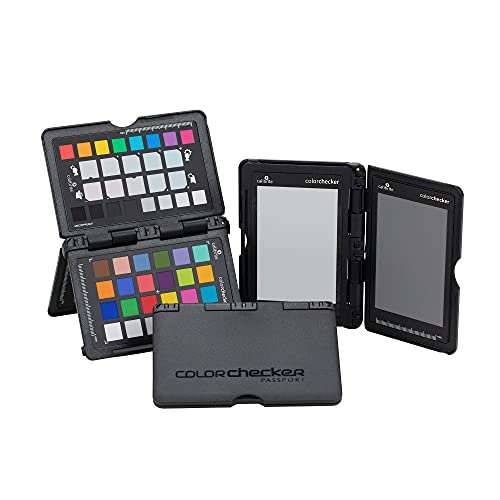
The Calibrite ColorChecker Passport Photo 2 helps you achieve accurate white balance and exposure for consistent passport photo results. This tool allows setting a custom in-camera white balance, removing the need for individual color corrections later. It includes a portable protective case and an innovative design that adapts to multiple positions, allowing quick inclusion of these calibration targets into any scene. Perfect for photographers seeking professional color accuracy in passport photography.
Calibrite Photo Kit – Display Pro HL and Passport Photo 2

This comprehensive kit includes the Display Pro HL colorimeter, capable of high luminance measurements up to 3,000 nits for superior color calibration, ideal for editing passport photos to exacting standards. Combined with the Passport Photo 2 tool, it ensures perfect color reproduction under varying lighting. The included camera calibration software enhances raw workflow color matching, making it well-suited to professional photographers or studios wanting precise control over passport photo quality.
Passport Photo Checklist Overlay Guide Tool

This overlay guide is a helpful tool for anyone producing US or Canadian passport photos. It visually details eight critical criteria to avoid photo rejection, including head size measurement and positioning outlines. By using this checklist during shooting, you can ensure your photo meets governmental standards before printing or submission. It is particularly useful for individuals handling passport photo applications without professional background knowledge.
Buying Guide for the Best Cameras and Systems for Passport Photos
Choosing the right camera or system for passport photos involves several factors beyond camera resolution. Here are key considerations:
- Compliance With Official Requirements: Passport photos must meet strict dimensional and background standards. Systems with integrated cutters or overlays can help ensure exact sizes and proper framing.
- Ease of Printing: Consider whether you want a complete printer system or just a photo calibration tool. Printer kits that include ink, paper, and die cutters simplify producing ready-to-submit photos.
- Compatibility With Your Device: Some systems transfer images via SD cards or USB, while others use wireless connectivity compatible with smartphones or tablets. Choose what suits your workflow best.
- Color Accuracy and Consistency: Tools like color calibration charts and white balance targets ensure consistent skin tone and color fidelity, reducing photo rejection risk due to lighting issues.
- Portability and Setup: Portable calibration devices allow flexible positioning for on-location shoots. Printer systems should be easy to assemble and operate.
- Included Accessories: Check for extras like passport cutters, calibration software, or step-by-step guides, as they add significant value and convenience.
By evaluating these perspectives, you can select a passport photo camera or printer system that meets your technical, practical, and compliance needs.